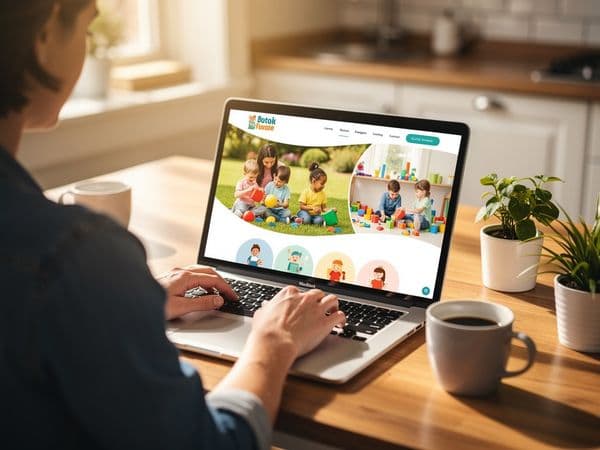
How to Make Your Daycare Website Look More Trustworthy
Build instant credibility with proven trust-building strategies for your daycare website that convert visitors into enrollments.

How to Make Your Daycare Website Look Trustworthy: A Complete Guide for Childcare Professionals
In today's digital-first world, your daycare website is often the first—and sometimes the only—impression parents have of your childcare center. Before they ever step through your doors, families are researching, comparing, and making critical judgments about whether you're the right place for their children.
Here's the reality: Trusting someone else with your child is one of the hardest decisions parents will ever make. Your website needs to do more than just look nice—it must systematically build confidence, address concerns, and make the choice to enroll feel safe, obvious, and right.
This comprehensive guide will show you exactly how to transform your daycare website into a trust-building powerhouse that converts anxious visitors into enrolled families.
Why Trust Matters More Than Features

When parents are choosing a daycare, they're not shopping for the flashiest website or the most colorful graphics. They're looking for safety, reliability, and peace of mind. The features you offer—extended hours, organic meals, enrichment programs—are important, but they're secondary to one fundamental question: Can I trust you with my child?
The Psychology Behind Parent Decision-Making
Understanding how parents think when researching childcare is crucial to building an effective website:
- Fear drives their research. Parents are scanning for red flags and risks. A poorly designed, outdated, or unprofessional website triggers alarm bells that can cost you thousands in lost enrollments.
- Trust is emotional, not logical. Once the logical boxes are checked (location, hours, pricing), the emotional decision—who feels trustworthy—determines the winner.
- First impressions happen in milliseconds. Research shows people form judgments about website credibility within 0.05 seconds. You have less time than it takes to blink to start building trust.
- Comparison is constant. Parents are looking at multiple daycares side-by-side. If your website looks amateurish compared to competitors, you're automatically eliminated from consideration.
The Cost of Low Trust
When a website fails to establish trust, the consequences are measurable and costly:
- High bounce rates: Parents leave immediately when your site doesn't feel professional
- Zero conversions: Even interested visitors won't contact you if your site feels unsafe
- Damaged reputation: A poor website creates negative word-of-mouth before you've even met a family
- Competitor handoffs: Visitors who don't trust you will trust someone else
A professional, trust-focused website isn't just nice to have—it's the foundation of your enrollment strategy.
Trust Signals That Work: The Proven Elements Parents Look For
Trust signals are visual or textual elements on your website that build credibility and reduce concerns. The right signals, placed strategically, can transform skepticism into confidence. Let's explore the most effective trust signals for childcare websites.
Testimonials and Success Stories
Testimonials are the single most powerful trust signal you can display. When other parents vouch for your care, new parents feel relief that someone else has walked this path successfully.
What Makes Testimonials Effective:
- Specific, not generic: "My son loves coming here every day" is weak. "My extremely shy 3-year-old became confident enough to lead circle time after six months—your teachers have a gift" is powerful.
- Include full names and ages: "Sarah M., mom of 4-year-old Marcus" feels real, while "Happy Parent" feels manufactured.
- Photos when possible: A testimonial with a child's photo (with permission) dramatically increases authenticity.
- Recent and ongoing: Show that families are still thriving with you now, not just years ago.
- Diverse experiences: Highlight testimonials about different age groups, special needs, and various concerns to show broad competence.
Where to Place Testimonials:
- Homepage hero section: Within 3 seconds of landing, visitors should see social proof
- Above the fold: At least one testimonial should be visible without scrolling on key pages
- Program pages: Show relevant testimonials near each program description
- Footer: Include rotating testimonials across all pages
- Thank you pages: After contact forms, reinforce their decision more testimonials
Certifications, Licenses, and Accreditations
Your credentials are the foundation of legitimacy. Display them prominently and make them easy to find.
Essential Credentials to Showcase:
- State childcare license: Make your license number visible and include a "Licensed and Inspected" badge
- CPR and First Aid certifications: Especially on staff pages—detail who is certified and when certifications expire
- Teaching credentials: Bachelor's degrees, ECE certifications, special education training
- National accreditation: NAEYC, National Association for Family Child Care, or state-specific quality ratings (QRIS)
- Health and safety recognitions: Smoke-free campus, organic food programs, safe sleep certifications
How to Display Credentials Effectively:
- Create a dedicated "About Us" or "Credentials" page that details all certifications
- Use official logos from licensing agencies and accrediting bodies (with permission)
- Add a credentials section to your homepage footer that appears on every page
- Include brief credential mentions on staff bios to reinforce individual qualifications
- Create a downloadable PDF of your full credential list for detailed evaluation
Professional Photography
Photos are not decoration—they're evidence. Every image on your website should answer the question: "Does this place look safe, clean, and nurturing?"
The Photo Checklist:
- Clean, well-lit facility photos showing all major spaces
- Genuine child engagement shots (with proper permissions)
- Teacher interaction moments that show care and enthusiasm
- Food and nutrition visuals if meals are part of your program
- Outdoor play areas in good weather and safety conditions
- Entry/exit security features that visibly protect children
- Age-appropriate classroom setups that show your educational approach
*Note: We'll dive deeper into photography strategy in Section 7.
Contact Information Transparency
Nothing raises suspicion like a website that makes contact difficult. Parents need multiple, easy ways to reach you—and the ease of contact signals confidence in your service.
Contact Elements That Build Trust:
- Local phone number: Not a generic toll-free line—parents want to call you directly
- Physical address: With an embedded Google Maps location
- Multiple contact options: Phone, email, and contact form
- Office hours: Clear indication when you'll respond
- Live chat (optional): Instant responses reduce anxiety for parents juggling schedules
- Social media links: Active profiles show you're engaged and present
Avoid These Red Flags:
- Hidden or missing contact information
- Forms that give no response timeline
- Generic email addresses (use your actual center name)
- No phone number listed
- Address that doesn't match what Google shows
Trust Badges and Security Indicators
Modern parents are savvy about online security. Show them you protect their data the same way you protect their children.
Essential Security Signals:
- SSL certificate: The green lock indicator that shows encryption
- Privacy policy link: Clear statement about how you handle their data
- No third-party tracking: Minimize pop-ups and unnecessary data collection
- Secure payment options: If accepting payments, display trusted payment processor badges
- Professional email domain: Your email should match your website (info@yourdaycare.com, not yourdaycare@gmail.com)
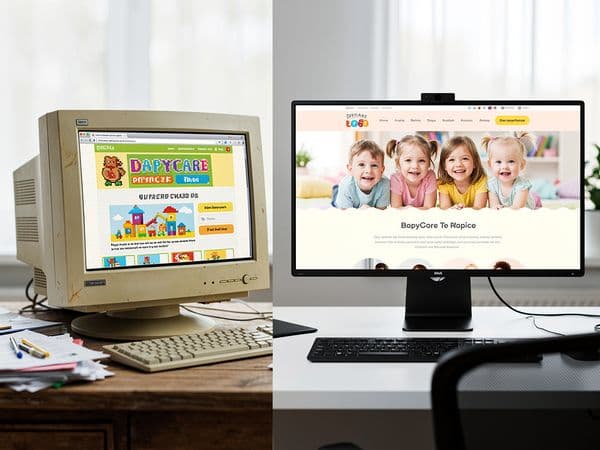
Professional Design vs DIY Templates: Why the Difference Matters

You can create a website yourself using free templates—it's never been easier. But when your business is built on trust, the difference between professional design and DIY becomes enrollment-making or enrollment-breaking.
The DIY Template Trap
Many daycare owners dive into website templates expecting it to be a quick, affordable solution. Here's what typically happens:
What Goes Wrong:
- Generic content remains: Placeholder text and stock images that make you look like every other center
- Poor mobile design: Parents browsing on phones encounter broken layouts and tiny buttons
- Confusing navigation: Parents can't find critical information quickly
- Slow loading times: Unoptimized images and code frustrate impatient visitors
- No conversion strategy: The site looks nice but doesn't guide visitors toward enrollment
- Maintenance nightmares: Updating becomes frustrating, leading to outdated information
The Opportunity Cost:
Every parent who leaves your DIY site because it feels unprofessional costs you hundreds—or thousands—in lost annual revenue. A professional website pays for itself in a single enrollment.
What Professional Daycare Website Design Delivers
Professional design isn't about making things pretty—it's about strategic communication and conversion optimization.
Strategic Elements You'll Get:
1. Child-Care-Specific Structure
Professional daycare websites follow structures proven to work for childcare:
- Above-the-fold trust: Immediately display license numbers, testimonials, and key value props
- Parent journey navigation: Help parents move from research → confidence → contact naturally
- Program clarity: Distinct paths for infant, toddler, preschool, and after-school families
- Staff credibility: Professional staff bios with photos and qualifications
- Tour CTA placement: Strategic call-to-actions encouraging facility visits
2. Mobile-First Design
The majority of parents research childcare on their phones—during lunch breaks, between meetings, or while picking up kids elsewhere. Mobile design isn't optional:
- Thumb-friendly navigation: Easy-to-tap buttons and clear menu structures
- Fast mobile loading: Optimized images that don't drain phone data
- Readability without zoom: Text sized for comfortable mobile reading
- Click-to-call functionality: One tap to dial your office
3. Conversion Optimization
A professional site doesn't just inform—it converts:
- Strategic form placement: Contact forms appear when interest is highest
- Clear enrollment paths: Parents know exactly what to do next
- Urgency without pressure: Limited spots mentioned naturally, not manipulatively
- Reduced friction: No unnecessary steps between interest and action
4. Ongoing Maintenance and Updates
Professional services include ongoing support:
- Content updates: New programs, seasonal information, and announcements
- Technical maintenance: Security patches, plugin updates, and backups
- Analytics tracking: Understanding what's working and what needs improvement
- Competitor awareness: Keeping your design competitive year-over-year
When DIY Makes Sense (and When It Doesn't)
DIY Might Work If:
- You're a one-person home daycare with very local, word-of-mouth referrals
- You have minimal budget and are using the site purely as a digital business card
- Your primary conversion happens offline and the website is secondary
Professional Design Is Essential If:
- You're actively seeking new enrollments
- You compete with multiple centers in your area
- Your enrollment revenue justifies the upfront investment
- You want your website working for you 24/7, not just when you're available
- You need mobile optimization that you can't achieve yourself
The Hybrid Approach:
Some centers use professional design for strategy and initial setup, then maintain content themselves. This can be effective if you're tech-savvy and trained on your platform.
Security & Privacy Signals: Protecting What Parents Care About Most
Parents are increasingly aware of digital privacy—and they're rightfully protective of their families' data. Your website needs to visibly protect their information.
The Privacy Policy You Need
A well-crafted privacy policy is not just legal boilerplate—it's a trust signal that shows you take responsibility seriously.
What Parents Want to See:
- Clear, plain language: Avoid dense legalese that parents can't understand
- What you collect: Be transparent about form submissions, contact information, etc.
- Why you collect it: Explain how their data helps you serve them better
- How you protect it: Describe your security measures
- Who else sees it: Clarify if any third parties are involved
- Their rights: Explain how they can request data deletion or access
- Contact for questions: Provide direct contact for privacy concerns
Where to Place Privacy Information:
- Homepage footer: Privacy policy link should be on every page
- Contact forms: Brief statement near the submit button explaining data use
- Registration pages: Reiterate privacy protection during sign-up processes
- About page: Include a brief privacy commitment statement
Website Security Essentials
Technical security measures need to translate into visible trust for parents.
Must-Have Security Features:
SSL/TLS Encryption
- Green lock indicator: Shows all browser users their connection is secure
- HTTPS protocol: No security warnings appear in browsers
- Site-wide encryption: Protect all pages, not just forms
Regular Security Updates
- Platform patches: Keep your CMS (WordPress, Squarespace, etc.) current
- Plugin security: Use actively maintained plugins with security reputations
- Vulnerability scanning: Regular checks for security threats
Strong Authentication
- Secure admin access: Complex passwords and two-factor authentication
- Limited access: Only necessary staff should have website editing ability
- Session timeouts: Automatically log out inactive sessions
Data Protection
- Secure backups: Regular, encrypted backups stored separately
- Data minimization: Only collect what you absolutely need
- Third-party vetting: Any external services must meet security standards
Addressing Photo Privacy Concerns
Many parents have concerns about photos of their children online. How you handle this shows respect for their boundaries.
Photo Privacy Options:
- No photos policy: Some centers don't display child photos at all—this can actually build trust with privacy-conscious families
- Opt-in only: Make photo display permission explicit in enrollment paperwork
- Face blurring: Show the spirit of your program while protecting identities
- Stock imagery: Use professional stock photos that represent your center's vibe
- Annual permission updates: Re-confirm photo permissions every enrollment cycle
Communicating Your Photo Policy:
- State it clearly: Add a section to your website explaining how you use photos
- Make it opt-in: Emphasize parental control over their child's image
- Show you respect it: Demonstrate you honor family privacy choices
- Offer alternatives: Show facility photos, teacher photos, and activity setups without children
HIPAA and FERPA Considerations
While full HIPAA compliance applies more to medical facilities, childcare centers still handle sensitive information that requires protection.
What to Protect:
- Medical information: Allergies, medications, health conditions shared via forms
- Family circumstances: Divorce situations, custody arrangements, home addresses
- Developmental notes: Observations about children's progress or challenges
- Emergency contacts: Sensitive personal contact information
- Photos and names: Any identifier that connects to a specific child
Compliance Signals:
- Secure form submissions: Use encrypted, password-protected enrollment forms
- Family portals: Consider password-protected areas for detailed family information
- Paper form option: Acknowledge that some families prefer secure paper over digital
- Training staff: Ensure all team members understand data protection expectations
Social Proof Elements: Let Others Do the Selling for You
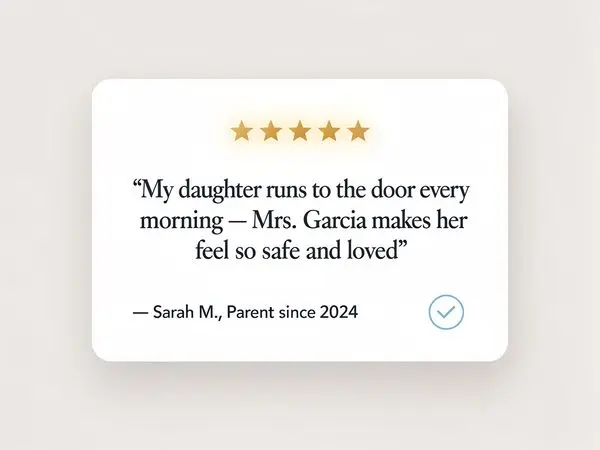
Parents trust other parents more than they trust marketing copy. Social proof—evidence that other families have had positive experiences—is the most powerful enrollment tool you have.
Beyond Basic Testimonials
We've touched on testimonials, but social proof goes deeper. Here's how to maximize its impact:
Video Testimonials
Why Video Works:
- Unfiltered emotions: Parents can see genuine joy and relief
- Harder to fake: Video testimonials feel more authentic than text
- Shareable: Easy to share on social media and embed on multiple pages
- Higher engagement: People spend more time watching than reading
What to Include:
- Parents talking about specific changes: "My daughter's confidence has grown so much..."
- Mention initial concerns and how they were resolved: Addresses common objections
- Day-to-day experiences: What does a typical day look like?
- Reason for choosing you: Why did you beat out competitors?
- Would they recommend?: Direct endorsement
Presentation Tips:
- Homepage featured video: Place the best testimonial above the fold
- Dedicated video gallery: Create a "Parent Stories" page with all videos
- Short and long versions: Offer 30-second clips and 2-3 minute deep dives
- Subtitles included: Many people watch videos without sound
Google Reviews and Ratings
Google reviews are the Yelp-equivalent for local businesses—and parents check them.
Google My Business Optimization:
Get Reviews:
- Ask strategically: Request reviews from happy parents at natural moments
- Make it easy: Include a direct link in your newsletter, text, or email signatures
- Don't demand: Encourage rather than pressure—genuine matters more than quantity
- Respond to all reviews: Show you engage with feedback professionally
Display Reviews:
- Embed on your website: Use a plugin or widget to show Google reviews live
- Respond publicly: Show potential families that you listen
- Handle negative reviews gracefully: Turn criticism into trust-building moments
Key Metrics:
- Goal: Aim for 15+ reviews with 4.5+ stars average
- Momentum: Encourage 1-2 new reviews per month
- Quality over quantity: Detailed reviews are more valuable than one-word ones
Social Media Integration
Active social media profiles validate your center as real, current, and engaged.
Integration Strategies:
- Live social feeds: Embed Instagram or Facebook posts on your homepage
- Follower counts: Display your engaged community size when meaningful
- Recent activity: Show you post regularly and consistently
- Positive comments: Moderate and highlight positive community interactions
What to Showcase:
- Daily life glimpses: Activities, celebrations, and milestones
- Seasonal events: Shows your calendar is full and active
- Holidays and traditions: Demonstrates cultural awareness and community
- Staff spotlights: Humanizes your team
- Parent-generated content: User testimonials, family events, and community
Privacy Considerations:
- Privacy settings: Ensure social accounts protect personal information
- Consent forms: Obtain social media permissions during enrollment
- No identifying details: Avoid posting last names or home addresses
- Age-appropriate content: Never show faces of children under 6 without explicit consent
Case Studies and Success Stories
Detailed stories about specific families (anonymized or with permission) provide deep social proof.
Effective Story Elements:
- The challenge: What concern did this family have? (separation anxiety, special needs, working parent schedule, etc.)
- The solution: How your center addressed it?
- The outcome: Tangible results and parent quotes
- The ongoing relationship: Where are they now? Still enrolled? Happy?
Where to Feature:
- Success stories page: Dedicated section for detailed narratives
- Program pages: Show case studies relevant to each program
- Email marketing: Share one story per newsletter
- Social carousel posts: Break stories into multiple social posts
Trust Through Consistency
Social proof isn't just about what you say—it's about demonstrating consistency across all touchpoints.
Consistency Checks:
- Same story everywhere: Your Google review story shouldn't contradict your Facebook posts
- Regular updates: Posting once a month then vanishing for three months looks suspicious
- Responsive engagement: Do you actually respond to comments and questions?
- Professional tone: Keep social voices consistent with your brand
- Photo quality consistency: Blurred, dark, or poorly-lit social photos undermine professionalism
Consistent Branding: Creating Recognition and Reliability
Branding isn't just logos and colors—it's the consistent experience parents expect every time they interact with your center. Consistency builds familiarity, and familiarity breeds trust.
The Elements of Childcare Branding
Visual Identity:
Color Palette:
- Primary colors: 2-3 main colors used consistently across website, email, signage, and marketing
- Childcare-appropriate hues: Bright welcoming colors that aren't overwhelming; pastels and warm tones often work best
- Accessibility consideration: Ensure color choices work for colorblind parents
Typography:
- Easy-to-read fonts: Prioritize legibility over creativity
- Limited font families: 2-3 maximum for consistency
- Age-appropriate styles: Friendly but professional, not childish
Logo:
- Professional but warm: Balance credibility with approachability
- Scalable: Must look good on a website header and a business card
- Memorable: Unique enough to stand out, familiar enough to be reassuring
- Proper placement: Always visible, never distorted or stretched
Photography Style:
- Consistent editing: Use the same filters, brightness, and color treatment
- Authentic representation: Show real moments, not staged perfection
- Inclusive imagery: Reflect the diversity of families you serve
- High quality: No pixelated, blurry, or poorly-lit images
Messaging and Tone:
Voice Characteristics:
- Warm and approachable: Parents need to feel you're welcoming
- Professional and knowledgeable: You're experts in child development
- Reassuring: Address concerns before they're asked
- Clear and direct: Avoid jargon and confusing language
Consistent Across Channels:
- Website copy: Same tone as your brochures and social posts
- Email communication: Professional but warm in newsletters
- Phone scripts: Reception staff communicate consistent values
- In-person presentations: Tours and meetings reinforce digital messaging
Why Inconsistent Branding Kills Trust
Inconsistency creates confusion, and confused parents don't enroll.
Inconsistency Red Flags:
- Mismatched logos: Different logo colors on your Facebook vs. website
- Varying phone numbers: Different contact numbers on different platforms
- Inconsistent pricing: Website price doesn't match phone quote
- Conflicting hours: Website says one thing, Google shows another
- Disconnected tone: Formal website but super-casual social media
- Photo quality variance: Professional website photos but blurry social images
Building a Brand That Converts
Your brand should reflect what makes your center special while remaining trustworthy.
Start With Your Differentiators:
- Specialized programming: Montessori, bilingual, STEM focus
- Unique values: Sustainability, mindfulness, inclusivity
- Community connections: Local partnerships and involvement
- Staff expertise: Years of experience, specific qualifications
- Facility features: Outdoor spaces, technology integration, nutrition programs
Translate Into Visual Identity:
- Montessori centers: Clean, natural, wood-toned aesthetics with emphasis on child independence
- Bilingual programs: Incorporate elements from both cultures respectfully
- Nature-focused: Earth tones, outdoor photos, organic shapes
- Technology-integrated: Modern, clean lines with tech-friendly imagery
Maintain Across Platforms:
- Create brand guidelines: Document your colors, fonts, logo usage, and tone for consistency
- Train all staff: Everyone representing your center should understand the brand
- Audit regularly: Check consistency across all touchpoints quarterly
- Update together: Changing one element should trigger coordinated updates elsewhere
Practical Branding Checklist for Daycares
Immediate Wins:
- [ ] Logo visible on all pages of website
- [ ] Color palette defined and applied consistently
- [ ] Font choices standardized across site
- [ ] Phone number same everywhere (including Google My Business)
- [ ] Social handles consistent across platforms
- [ ] Professional logo versions for different applications (light/dark backgrounds)
Strategic Moves:
- [ ] Brand style guide created and accessible to all staff
- [ ] Photography style documented and followed
- [ ] Messaging tone guidelines established
- [ ] Email signature templates created
- [ ] Print materials match digital materials
- [ ] Annual brand audit completed
Real Photos vs Stock Photos: The Trust Trade-Off
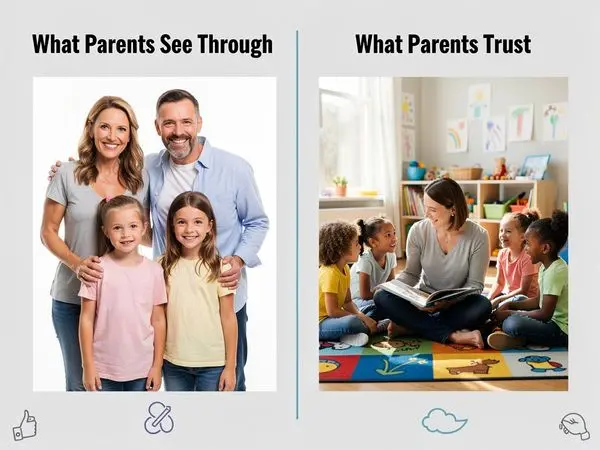
This is one of the most important decisions you'll make about your daycare website's visual content. Let's break down the pros, cons, and strategic approach.
The Case for Real Photos
Why Authentic Photos Build More Trust:
They're Undeniable:
- Your actual facility: Parents see exactly what they'll get
- Your actual staff: They meet the real people caring for their children
- Your actual children (with permission): Proof of happy, thriving families
- Your real activities: Shows your daily life, not idealized fantasies
They Answer Specific Questions:
- Is the classroom big enough?
- How are materials organized?
- Does the playground look safe?
- Is there outdoor space?
- What does the kitchen look like?
- Where is the security entrance?
They Show Your Unique Character:
- Your specific teaching style
- Your center's personality and energy
- Your facility's layout and flow
- Your community's demographics and vibe
When Stock Photos Make Sense
Stock photography isn't inherently bad—it's about strategic use.
Appropriate Stock Photo Uses:
Privacy Protection:
- Some parents prefer no child photos: Stock images respect this boundary
- Protecting vulnerable populations: When working with trauma-affected families
- Security-conscious environments: Avoiding identifiable child photos on public sites
Supplementing Real Photos:
- Concept illustrations: Showing educational concepts (brain development, milestones)
- Emotional moments: Universal experiences like graduation, birthday celebrations
- Activity diversity: Demonstrating variety you offer but can't all photograph
- Before/after visuals: Showing progress and transformation
Brand Consistency:
- Professional aesthetic: Stock can be higher quality than amateur real photos
- Consistent style: Matching brand colors and visual identity precisely
- Accessibility: Larger images, proper alt text, optimized for web
The Hybrid Strategy (Recommended)
The best approach combines both strategically:
Foundation: Real Photos
- Facility exterior and interior: Every room, outdoor area, common spaces
- Staff photos with bios: Professional headshots and candid teaching moments
- Activity shots (with permission): Real children engaged in your programs
- Food service photos: Actual meals and nutrition setup
- Safety features: Show your security measures visibly
Supplement: Stock Photos
- Concept imagery: Developmental milestones, curriculum elements
- Emotional moments: Graduation emotions, parent hand-offs
- Diversity demonstration: Ensure representation beyond your current enrollment
- Filler images: When you lack specific real photos
- Social media: When you can't get good real photos on time
The "Bad Real Photo vs Good Stock Photo" Decision
Never Use Real Photos That:
- Are blurry, dark, or poorly lit
- Show messy, unorganized spaces
- Include children's faces without permission
- Look unprofessional or candidly chaotic
- Are outdated or don't represent current reality
- Show security vulnerabilities (like visible key codes or unlocked doors)
When to Choose Stock Instead:
- You don't have professional-quality real photos
- Privacy is a primary concern for your market
- You need to demonstrate diversity beyond current enrollment
- You're launching and haven't photographed everything yet
- Your real spaces are under construction or renovation
Photography Best Practices for Daycares
If Taking Your Own Real Photos:
Technical Quality:
- Good lighting: Natural light is best; avoid harsh flashes
- Stable shots: Use a tripod or steady your camera/phone
- High resolution: Shoot in best quality, then optimize for web
- Professional editing: Basic corrections for brightness, contrast, and color
Content Considerations:
- Get permissions: Written consent for children's photos
- Focus on engagement: Action shots showing joy and learning
- Clean spaces first: Photograph before mess accumulates
- Multiple angles: Wide shots plus detail shots
- Seasonal variety: Capture different times of year
Professional Photography:
- Worth the investment: For primary website images, professionals deliver trust
- Specialized vendors: Some photographers specialize in education/childcare
- Comprehensive sessions: Get lots of shots to use across platforms
- Annual updates: Keep imagery current with yearly sessions
Permissions and Documentation:
- Photo consent forms: Include in enrollment paperwork
- Scope clarity: Specify uses (website, social media, marketing materials)
- Withdrawal option: Allow parents to revoke consent
- Record keeping: Maintain signed forms in files
FAQ: Your Most Important Trust-Building Page
A thoughtfully designed FAQ addresses parents' unspoken concerns before they even have to contact you. It's not just information—it's anticipation and reassurance.
Why FAQs Build Trust
They Show You Understand Parents:
- You anticipate concerns: Addressing questions shows you know what worries families
- You're transparent: Honest answers build credibility better than sales language
- You're accessible: Clear, direct answers demonstrate you have nothing to hide
- You're experienced: Good FAQs show you've heard and solved these problems before
They Reduce Friction:
- Save contact effort: Parents get answers instantly instead of calling
- Pre-qualify concerns: Address deal-breakers before parents invest time
- Support decision-making: Help self-select ideal families
- 24/7 availability: FAQs work when you're not available to answer
FAQ Categories That Build Trust
Safety and Security (Highest Priority):
- "How do you keep children safe?"
- "What's your check-in/check-out process?"
- "Are your teachers background-checked?"
- "How do you handle emergencies?"
- "What health and safety protocols do you follow?"
- "Do you have security cameras?"
- "How are allergies and medications managed?"
Staff and Qualifications:
- "What are your teacher's credentials?"
- "What's your staff training program?"
- "How is your staff-to-child ratio?"
- "Do you have low turnover? How long do teachers stay?"
- "What's your hiring process?"
- "Are teachers CPR/First Aid certified?"
Program and Curriculum:
- "What's your educational philosophy?"
- "How do you handle different learning styles?"
- "What does a typical day look like?"
- "Do you have special programs (bilingual, STEM, Montessori)?"
- "Technology and screen time policies?"
- "How do you track and communicate child development?"
Logistics and Operations:
- "What are your operating hours?"
- "Do you offer flexible scheduling?"
- "What are your holiday closures?"
- "What's your sick policy?"
- "Late pickup fees?"
- "Meal and snack policies?"
- "Nap/rest time approach?"
- "Potty training policies?"
Financial:
- "What's your pricing structure?"
- "Are there additional fees?"
- "Payment options?"
- "Deposit and cancellation policies?"
- "Financial assistance programs?"
- "Payment plan availability?"
Enrollment Process:
- "What's your enrollment timeline?"
- "Is there a waiting list?"
- "How do we start?"
- "What documents are required?"
- "Can we tour before enrolling?"
- "Trials or trial days available?"
FAQ Writing Best Practices
Answer Completely:
- Full sentences: Not fragments or bullet points
- Provide specifics: Include numbers, times, and detailed explanations
- Anticipate follow-ups: Answer the next logical question in the same response
- Use examples: Concrete scenarios help understanding
Tone and Language:
- Conversational but professional: Approachable, not overly formal
- Honest and direct: Don't sugarcoat difficult answers
- Reassuring without overpromising: Show confidence, not guarantees
- Show personality: Let your center's character come through
Organization:
- Categorize clearly: Group related questions together
- Prioritize important topics: Put safety, staff, and program first
- Make scannable: Use collapsible sections or clear headers
- Internal links: Link to relevant pages for deeper information
Maintenance:
- Update regularly: Add new questions parents ask regularly
- Remove outdated info: Seasonal or temporary policies shouldn't stay forever
- Track which questions get answered: If parents keep asking the same questions, improve those answers
- Use real parent questions: Pull from your actual inquiries
Ready to Transform Your Daycare Website Into a Trust-Building Engine?
You've just learned the comprehensive blueprint for creating a daycare website that builds trust, reduces concerns, and converts visitors into enrolled families. You know:
- Why trust matters more than features in parent decision-making
- The trust signals that work—testimonials, credentials, transparency, and security
- Why professional design beats DIY templates for enrollment results
- How to protect and communicate about privacy with parents
- The power of social proof across testimonials, reviews, and case studies
- Why consistent branding creates the familiarity parents need
- The strategic balance between real and stock photos—authenticity with professionalism
- How a well-crafted FAQ preempts concerns and accelerates decisions
But here's what you're probably realizing: implementing all of this yourself is overwhelming. If you're already running a daycare, managing staff, caring for children, and handling enrollment—you don't have time to become a web designer, photographer, copywriter, and SEO expert.
That's where we come in.
At Valley Daycare Sites, we specialize in creating professional, trust-focused websites specifically for childcare centers like yours. We understand:
- What parents look for when researching daycare options
- How to structure a site for maximum trust and conversion
- Which features matter and which distract
- How to balance professionalism with warmth
- The technical requirements for security and mobile optimization
- How to make your site work while you sleep, bringing in leads and enrollment interest 24/7
We have built dozens of daycare websites. We know the specific elements that work, the parent psychology that drives decisions, and the design patterns that convert visitors into tours and tours into enrollments.
Get Your Free Sample Homepage
The best way to see what we can do for YOUR center is to experience it firsthand. We'll create a free sample homepage for your daycare that shows:
- Professional design that builds instant credibility
- Strategic trust signals positioned for maximum impact
- Mobile-optimized layout that works on every device
- Clear call-to-actions that guide parents toward enrollment
- Your unique programs and personality presented with confidence
See how your center could look with professional childcare website design. No strings attached—just a sample you can review, share with your team, and use to decide if working together makes sense.
Get your free sample homepage at valleydaycaresites.com
Your competitors are building trust online. Your future families are searching right now. Don't let a DIY website cost you another enrollment. Let us show you what a professional, trust-building daycare website looks like.
---
Valley Daycare Sites — Professional Website Design for Childcare Centers
Expert childcare-specific design • Mobile-optimized • Trust-focused conversion strategies • SEO optimized• Ongoing maintenance included
Ready to Transform Your Daycare Website?
Get a free sample homepage designed specifically for your daycare. No upfront cost, no pressure.
Get Your Free Sample