Local SEO for Daycares in 2026: The Complete Guide to Getting Found on Google
Step-by-step local SEO guide for daycare centers. Learn how to rank on Google Maps, optimize your website, and attract more local families.
Local SEO for Daycares in 2026: The Complete Guide to Getting Found on Google
Running a successful daycare center in 2026 requires more than just a loving environment and a safe facility. It requires visibility. You can offer the best curriculum in the state, the most nutritious meals, and the most compassionate staff, but if local parents cannot find you when they search for "daycare near me," those benefits do not matter.
In the modern digital landscape, the first step for 90% of parents searching for childcare is not calling a number from a flyer or walking into a lobby. It is opening their smartphone and searching on Google. This is where Local Search Engine Optimization (Local SEO) becomes the lifeblood of your enrollment pipeline.
Many daycare directors view marketing as a cost center, often spending thousands on Facebook ads or billboards with little return on investment. However, Local SEO is different. It targets parents who are actively looking for care right now, in your specific neighborhood. This guide is designed to take you from feeling overwhelmed by technology to confidently managing your digital presence. We will walk through exactly how to optimize your Google Business Profile, structure your website, gather reviews, and track your success—all without needing a degree in computer science.
1. Why Local SEO Matters More for Daycares Than Any Other Marketing
Before diving into the technical details, it is crucial to understand why Local SEO is the highest-ROI activity for a childcare business. Unlike national brands that rely on broad awareness, your daycare serves a hyper-local radius, typically within 5 to 10 miles of your physical location.
The Intent Gap
When a parent types "daycare" into Google, they are often in the early research phase. When they type "daycare near me" or "childcare in [Your City]," they have high intent. They are ready to tour, ready to ask for pricing, and ready to enroll. Local SEO captures this high-intent traffic.Consider the cost comparison between traditional advertising and Local SEO: * Pay-Per-Click (PPC) Ads: You might pay between $8.00 and $15.00 per click for keywords like "daycare [City Name]." If you get 20 clicks a month, that is $200 to $300 with no guarantee of a tour. * Local SEO: Once you rank organically on the first page of Google Maps or search results, the clicks are free. The only cost is your time or the investment in optimizing your site.
Trust and Proximity
Parents are making a decision about the safety of their most valuable possession. Trust is the currency of the childcare industry. Google’s algorithm prioritizes businesses that appear trustworthy and relevant to the user's location. When a parent sees your center at the top of the map pack (the three listings that appear at the top of Google search results), it subconsciously validates your legitimacy.Furthermore, 2026 search algorithms heavily favor proximity. If a parent is searching from their home or workplace, Google will prioritize daycares closest to them. If your Local SEO is optimized, you dominate that local radius, effectively shutting out competitors who are further away.
The Mobile-First Reality
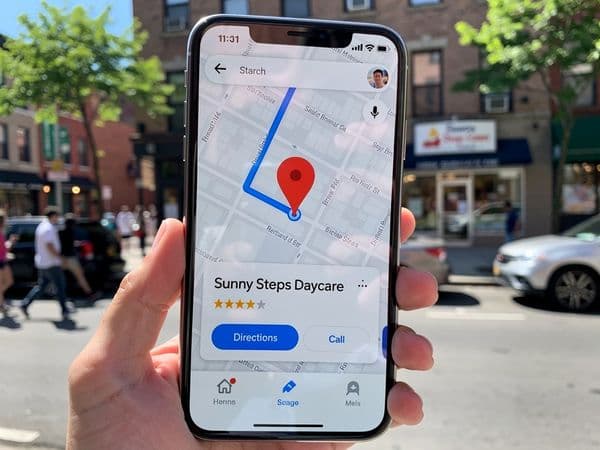
By 2026, over 70% of all childcare searches will happen on mobile devices. Parents are often searching while at work during lunch breaks or while running errands. They need quick answers: phone numbers, hours of operation, and directions. Local SEO ensures that this information is front and center on a mobile screen, reducing friction and encouraging a phone call or a booking request.2. Google Business Profile: The Foundation
Your Google Business Profile (GBP) is the single most important asset in your Local SEO strategy. It is the listing that appears in Google Maps and the local search results. If you treat your website as your digital front door, your GBP is the sign out on the lawn. A complete and optimized profile is non-negotiable.
Step-by-Step Setup Walkthrough
Step 1: Claim or Create Your Profile
Go to business.google.com and sign in with a dedicated Google account. Do not use a personal Gmail address that belongs to a staff member who might leave the company. Create a generic account like marketing@yourdaycare.com or owner@yourdaycare.com to ensure ownership remains with the business. Search for your business name. If it exists, claim it. If not, create a new listing.
Step 2: Verify Your Business Google requires verification to prove you are a real business. The most common method is postcard verification, where Google mails a code to your physical address. This can take 5 to 14 days. Ensure your address is accurate. Do not use a P.O. Box unless you have a physical location where you meet clients.
Step 3: Select the Right Categories This is critical. Your primary category should be "Day Care Center." Secondary categories can include "Preschool," "Child Care Agency," or "After School Program." Choosing the correct categories helps Google understand what you offer and when to show your profile.
Step 4: Optimize Your Description You have 750 characters to describe your center. Do not waste this space on corporate jargon. Write for parents. Mention your location, your age groups, and your unique selling points. * Bad Example: "We provide quality education services." * Good Example: "Serving families in Downtown Austin since 2010, Sunshine Daycare offers infant care, toddler programs, and pre-K curriculum. We are open from 6:30 AM to 6:00 PM with organic meals included."
Step 5: Add High-Quality Photos
Profiles with photos receive 42% more requests for directions and 35% more click-throughs to websites. Upload at least 50 photos. Include:
* Exterior shots (so parents can recognize the building).
* Classroom interiors (clean, colorful, organized).
* Staff photos (smiling, professional).
* Activity shots (children playing, eating, learning).
* Tip: Rename your image files before uploading. Instead of IMG_1234.jpg, name it daycare-in-austin-infant-room.jpg.
Step 6: Set Your Attributes Google offers specific attributes that act as filters for searchers. Check all that apply: "Women-led," "Wheelchair accessible," "Free Wi-Fi," "Organic food," or "Secure entry." These attributes make your listing stand out in the map view.
Step 7: Manage Hours and Holidays Nothing frustrates a parent more than calling a number that isn't answered. Ensure your regular hours are accurate. Most importantly, update your special hours for holidays, snow days, or teacher workdays immediately. If your hours are wrong, parents may assume you are closed.
Step 8: Add Services and Products You can list specific services under the "Services" tab. Add "Infant Care," "Toddler Program," "Preschool Curriculum," and "Summer Camp." You can also add "Products" if you sell tuition packages or merchandise. This adds keyword relevance to your profile.
3. On-Page SEO for Your Daycare Website
While your Google Business Profile handles map visibility, your website is where parents go to learn the details before they call. On-Page SEO refers to optimizing the content and structure of your website so search engines understand what it is about and where it is located.
Title Tags and Meta Descriptions
The Title Tag is the blue link that appears in Google search results. It is the most important on-page element. * Format: [Primary Keyword] - [City/Location] | [Business Name] * Example: "Top Rated Daycare in Springfield | Happy Kids Childcare" * Length: Keep it under 60 characters so it doesn't get cut off on mobile screens.The Meta Description is the short paragraph under the title link. It doesn't directly affect ranking, but it affects click-through rate. * Example: "Enrolling now for 2026! Licensed daycare in Springfield offering infant to preschool care. Secure facility, organic meals, and experienced teachers. Call for a tour."
Header Tags (H1, H2, H3)
Headers structure your content for readers and bots. * H1 Tag: Every page should have only one H1. This should be the main title of the page. For your homepage, avoid "Welcome to Our Website." Instead, use "Premier Childcare Center in [City Name]." * H2 Tags: Use these for section breaks. Examples: "Our Curriculum," "Meet the Teachers," "Tuition and Fees." * H3 Tags: Use these for sub-points under H2s.Local Keywords Integration
You must naturally integrate location-specific keywords throughout your site. * Don't: Stuff keywords unnaturally. "Daycare daycare daycare Springfield Springfield." * Do: Write naturally. "We are proud to be the leading daycare provider for families in Springfield and the surrounding Oakwood neighborhoods."Create a dedicated "Service Area" page. List the neighborhoods and towns you serve. For example: "Serving Springfield, Oakwood, Riverside, and Westfield." This signals to Google that you are relevant to all those specific areas.
Mobile Optimization
Google uses "Mobile-First Indexing," meaning it looks at your mobile site before your desktop site to determine ranking. * Ensure buttons are large enough to tap with a thumb. * Text should be readable without zooming. * Forms should be short. If a parent has to type their full name and address just to request a tour, they might leave. Ask only for Name, Email, Phone, and Child's Age.Page Speed
A slow website kills conversions. If your site takes more than 3 seconds to load, 53% of mobile users will abandon it. * Action: Compress all images before uploading them. Use tools like TinyPNG or a WordPress plugin like Smush. * Action: Avoid heavy video backgrounds on the homepage. These drain battery life and load slowly.4. Content Strategy: What to Write to Rank Locally
Many daycare owners think a website only needs a Home, About, and Contact page. This is a missed opportunity. Content is how you answer the questions parents are asking before they even reach out to you. By writing helpful articles, you establish authority and capture search traffic.
The Parent FAQ Strategy
Parents have anxiety when choosing a daycare. They have questions. Create a "Frequently Asked Questions" page that answers these directly. * "What is your staff-to-child ratio?" * "Do you provide meals or snacks?" * "What happens if my child gets sick?" * "How do you handle discipline?"By answering these, you reduce the friction of a phone call. A parent who reads the answer on your site is more likely to call to schedule a tour rather than just asking for pricing.
Blog Topics That Rank Locally
You do not need to write daily. Aim for one high-quality article per month. Focus on topics that combine your services with local intent. * "Preschool vs. Daycare: What Parents in [City] Need to Know" * "5 Best Parks and Playgrounds Near [Your Daycare Name]" * "How to Prepare Your Toddler for Their First Day of School" * "Understanding [City] State Licensing Requirements for Daycares"These articles signal to Google that you are an expert in your local area. They also give you content to share on social media, which further builds engagement.
Community Involvement
Write about your participation in local events. Did your center sponsor the local 5K? Did you host a toy drive for the city shelter? * Example: "Happy Kids Daycare Hosts Annual Spring Fair in Downtown Park." * Why it works: It links your brand to the community. If local news outlets write about the event, they often link back to your website, which boosts your domain authority.Video Content
By 2026, video is a dominant search format. Embed videos on your website. * Create a "Virtual Tour" video. * Record short clips of daily activities (ensuring no child faces are identifiable unless you have consent). * Upload these to YouTube and embed them on your site. Google often features video results in search snippets.5. Reviews: The Local Ranking Signal That Matters Most
Reviews are the new word-of-mouth. They influence 93% of consumers' purchasing decisions. For daycares, reviews are even more critical because the stakes are high. A 4.5-star rating looks significantly better than a 3.5-star rating.
The Impact of Reviews on SEO
Google uses review quantity, quality, and recency as ranking factors. A profile with 50 reviews will generally outrank a profile with 5 reviews, assuming the content is similar. Furthermore, keywords found in reviews can help you rank for those terms. If parents frequently mention "infant care" in their reviews, Google associates your business with that service.How to Ask for Reviews (Without Being Pushy)
Do not just wait for reviews to happen. You must ask. * The Timing: Ask for a review when the parent is happiest. This is usually after a milestone (like a child walking or talking) or after a successful tour where you feel the connection is made. * The Method: Send a text message or email with a direct link. * The Script: "Hi [Parent Name], it was great meeting you today! We are so excited to welcome [Child's Name] to our family. If you have a moment, would you mind sharing your experience on Google? It helps us reach more families like you. [Link]"Responding to Reviews
You must respond to every review, good or bad. * Positive Reviews: Thank them personally. Mention the child's name if appropriate. "Thank you, Sarah! We love having little Leo in our classroom. It makes our day to hear you're happy with the curriculum." * Negative Reviews: Do not get defensive. Acknowledge the concern, apologize, and offer to take the conversation offline. "Hi [Name], we are sorry to hear your experience wasn't what you expected. We take safety very seriously. Please contact our director at [Phone Number] so we can discuss this further." This shows prospective parents that you are responsive and professional.Review Velocity
Consistency matters more than a sudden spike. Getting 10 reviews in one day looks suspicious to Google. Aim for a steady stream, such as 1 or 2 reviews per week.6. Citations and Directories: Getting Your NAP Right Everywhere
A "citation" is any place on the internet where your business name, address, and phone number (NAP) are listed. Consistency is key. If your phone number is (555) 123-4567 on Google, it must be (555) 123-4567 on Yelp, your website, and the chamber of commerce site.
Why Consistency Matters
Search engines crawl the web to verify your business exists. If they find conflicting information, they lose trust in your data, which lowers your ranking. In 2026, data aggregation services feed information to dozens of directories. If you update your hours on one but not another, you confuse the algorithm.Top Directories for Daycares
- Google Business Profile: (Priority #1)
- Bing Places: Microsoft Bing still holds a significant market share, especially on desktop computers used by HR departments and working parents.
- Yelp: Parents often check Yelp for detailed reviews.
- YellowPages: Still a relevant directory for local businesses.
- Care.com: A niche directory specifically for childcare.
- Sittercity: Another niche childcare directory.
- Local Chamber of Commerce: Adds high authority to your local profile.
- Facebook: Your Facebook Business Page acts as a citation. Ensure the address matches Google exactly.
Managing Citations
Use a tool like BrightLocal or Whitespark to audit your citations. These tools cost between $30 and $60 per month but save hours of manual work. They will show you which directories have inconsistent data so you can fix them.Action Item: Create a spreadsheet. List your Business Name, Address, Phone, Website URL, and Hours. Use this exact text for every single directory you sign up for. Do not abbreviate "Street" as "St." in one place and write "Street" in another. Pick one format and stick to it.
7. Technical SEO Basics
Technical SEO sounds intimidating, but for daycares, it boils down to three things: speed, mobile, and data structure. You do not need to know how to code; you need to know what to ask your web developer or hosting provider.
Site Speed
As mentioned earlier, speed is a ranking factor. * Hosting: Use a reliable host (e.g., SiteGround, WP Engine). Avoid free hosting plans like WordPress.com free tier, as they often perform poorly. * Caching: Ensure your site uses caching. This stores a static version of your site so it loads faster for returning visitors. * Tools: Run your site through Google PageSpeed Insights. If you score below 50 on Mobile, you need to contact your developer.Mobile Optimization
Check your site on your phone. Can you easily click the "Call Now" button? Does the text scroll horizontally? If the menu is hard to access, you are losing customers. * Test: Open your site on different phones (iPhone and Android). If it looks broken on one, fix it.Schema Markup
Schema markup is a code you put on your website that helps search engines understand your content better. For daycares, "LocalBusiness" schema is essential. * What it does: It tells Google explicitly, "This is a Day Care Center, here is our price range, here are our opening hours." * Result: This can lead to "Rich Snippets" in search results, where your star rating, price, and hours show up directly under the link. * Implementation: Most modern website builders (like Wix, Squarespace, or WordPress with Yoast SEO) handle this automatically. If you have a custom site, ask your developer to implementSchema.org/LocalBusiness markup.SSL Security
Your website must have an SSL certificate (the little padlock icon in the browser bar). Google flags non-secure sites (HTTP) as "Not Secure," which scares parents away. Ensure your URL starts withhttps://.8. Tracking Your Results
You cannot improve what you do not measure. Many daycare owners set up their website and then never look at the data. You need to know which marketing efforts are filling your enrollment slots.
Google Search Console (GSC)
This is a free tool from Google that shows how your site appears in search results. * What to track: * Impressions: How often your site showed up in search. * Clicks: How many people actually clicked. * Keywords: What terms people typed to find you (e.g., "daycare near me"). * Goal: Watch for an upward trend in impressions and clicks over 6 months.Google Analytics 4 (GA4)
This tool tracks what people do after they land on your site. * Events to Track: * Phone Calls: Track how many people clicked the "Call" button on your mobile site. * Form Submissions: Track how many people submitted the "Schedule a Tour" form. * Time on Page: If they spend less than 10 seconds on a page, they might not be finding what they need. * Conversion Goals: Set up a "Goal" for when someone reaches the "Thank You" page after submitting a form. This tells you exactly how many leads you are generating.Call Tracking
If you are running ads or have multiple phone numbers (e.g., one for the office, one for tours), consider a call tracking service like CallRail. It costs about $30-$50 per month but records calls and attributes them to specific marketing sources. You will know if the lead came from Facebook, Google Search, or a flyer.Monthly Reporting
Create a simple spreadsheet to track these metrics monthly:- Total Website Visits.
- Total Phone Calls (from GSC and CallRail).
- Total Tour Requests.
- New Enrollments.
- Review Count (Total).
This data will help you justify your marketing budget and adjust your strategy. If you get 100 visitors but 0 calls, your call-to-action buttons might be too small. If you get 50 calls but 0 tours, your pricing might be unclear or your script needs work.
9. Local SEO Checklist for Daycares
To make this actionable, use this comprehensive checklist. Print it out or save it as a digital document. Check off items as you complete them.
| Task | Priority | Status | Notes | | :--- | :--- | :--- | :--- | | Google Business Profile | | | | | Claim and verify listing | High | ☐ | Ensure address is exact | | Add 50+ photos (interior/exterior) | High | ☐ | Rename files with keywords | | Set accurate hours and holidays | High | ☐ | Update for school breaks | | Add attributes (e.g., wheelchair accessible) | Medium | ☐ | Check all that apply | | Post weekly updates (events, news) | Medium | ☐ | Keep profile active | | Website On-Page | | | | | Optimize Title Tags (Keyword + City) | High | ☐ | Check on all main pages | | Optimize Meta Descriptions | Medium | ☐ | Compelling copy | | Add H1, H2, H3 headers | High | ☐ | Ensure logical structure | | Create Service Area Page | Medium | ☐ | List neighborhoods served | | Reviews | | | | | Set up automated review request system | High | ☐ | Text or Email after tour | | Respond to all new reviews (within 48 hrs) | High | ☐ | Positive and Negative | | Aim for 50+ total reviews | High | ☐ | Track progress | | Citations | | | | | Audit NAP consistency (Name, Address, Phone) | High | ☐ | Use BrightLocal or similar | | Claim Bing Places | Medium | ☐ | Verify listing | | Claim Care.com and Sittercity | Medium | ☐ | Niche directories | | Technical | | | | | Test site on mobile devices | High | ☐ | Check button sizes | | Ensure SSL (https) is active | High | ☐ | Check for padlock icon | | Install Google Analytics 4 | High | ☐ | Set up conversion tracking | | Install Google Search Console | High | ☐ | Verify ownership | | Content | | | | | Publish 1 local blog post per month | Medium | ☐ | Focus on local keywords | | Create detailed FAQ page | Medium | ☐ | Answer common parent questions | | Add "Virtual Tour" video | Medium | ☐ | Embed on Homepage |
10. Conclusion
Local SEO is not a one-time project; it is an ongoing practice. The digital landscape changes constantly, but the core principle remains the same: make it easy for parents to find you, trust you, and choose you. By optimizing your Google Business Profile, refining your website, managing reviews, and tracking your data, you build a sustainable engine for enrollment growth.
In 2026, families are more connected than ever, but they are also more discerning. They want transparency, safety, and community. Your online presence is your first handshake with them. Treat it with the same care and professionalism you treat the children in your care.
Remember, you do not have to do everything at once. Start with your Google Business Profile and your website's mobile experience. Once those are solid, move on to reviews and content. Consistency wins the long game.
If you are ready to take your digital presence to the next level, ensure your foundation is rock solid. We recommend starting with a thorough audit of your site's essential elements.
* Essential Web Features: To help you build a better site, read our guide on the daycare website must-haves for 2026. * First Impressions: Learn what catches a parent's eye first when they visit your site in our article, what parents notice first on a daycare website.
By following this guide and committing to these practices, you will ensure that when parents search for "daycare near me," they find the loving, professional environment you have created.
---
Frequently Asked Questions
How long does it take to see results from Local SEO? Local SEO is a marathon, not a sprint. You may see improvements in your Google Business Profile ranking within 4 to 6 weeks. However, significant organic traffic growth from your website usually takes 6 to 12 months of consistent content creation and optimization.
Can I rank for keywords in a city 20 miles away? It is difficult. Google prioritizes proximity. You can try to rank for surrounding towns if you explicitly mention them in your content and citations, but your primary focus should be your immediate 5-mile radius where most of your students will come from.
Is it okay to offer incentives for reviews? No. Google's policy strictly forbids offering compensation in exchange for reviews. This can lead to your profile being suspended. Instead, offer a general incentive for feedback, such as entering them into a monthly raffle, but ensure the review itself is voluntary and honest.
Do I need to hire an agency? Not necessarily. If you are willing to dedicate 3 to 5 hours a month to managing your listings and content, you can do this in-house. However, if you find the technical side overwhelming, hiring a specialist can save time and ensure mistakes are avoided.
What if I get a negative review? Do not delete it if possible. Respond professionally, address the concern, and offer to resolve it offline. A few negative reviews among many positive ones actually look more authentic than a perfect 5.0 rating with no critical feedback.
---
Disclaimer: This guide is for educational purposes. Search engine algorithms change frequently. Always verify the latest guidelines from Google and other search engines.
Ready to Transform Your Daycare Website?
Get a free sample homepage designed specifically for your daycare. No upfront cost, no pressure.
Get Your Free Sample